


Complete Guide to RTMP: The Real-Time Messaging Protocol
RTMP (Real-Time Messaging Protocol) remains a foundational technology in modern streaming workflows, especially for live video ingest. While its popularity has waned in some areas due to the rise of newer technologies like HLS (HTTP Live Streaming) and DASH (Dynamic Adaptive Streaming over HTTP), it remains relevant and important for several reasons, especially in traditional streaming workflows and legacy systems.
Key Takeaways
- RTMP streaming is still widely used for ingest into a streaming server
- The Real-Time Messaging Protocol enables persistent, low-latency connections
- RTMP is no longer used for playback but remains essential in live workflows
- RTMP vs RTSP depends on your use case (broadcast vs surveillance)
- RTMP works best when paired with modern playback formats like HLS
Table of contents
- Key Takeaways
- What Is RTMP?
- How Does RTMP Ingest Work?
- What Is RTMP Used For?
- What are RTMP settings?
- How to configure RTMP?
- Is RTMP Outdated?
- Is RTMP 1935 TCP or UDP?
- Is RTMP Better Than RTSP?
- Advantages of RTMP
- When considering the many contribution protocol options, what are the disadvantages of RTMP?
- RTMP Protocol Variations and Encoding
- Related Apps/Platforms
- FAQs
- What is the primary purpose of RTMP?
- Is RTMP still a viable protocol for modern streaming?
- Can RTMP work with popular streaming software like OBS?
- Is RTMP secure?
- Are there more secure versions of RTMP available?
- What is enhanced RTMP?
- Is enhanced RTMP better than RTMP?
- Does OBS support enhanced RTMP?
- How to stream with enhanced RTMP?
- How to test your RTMP Workflow
- The Role of RTMP in Modern Streaming Workflows
What Is RTMP?
RTMP, or Real-Time Messaging Protocol, is a video streaming protocol initially developed by Macromedia (later acquired by Adobe) to deliver live audio, video, and data over the internet as both an ingest and playback protocol. By establishing a persistent connection between the source (like a camera or encoder) and the streaming server, it ensures smooth and reliable data flow. It became widely recognized for its low latency, making it ideal for interactive applications and live streaming events.
How Does RTMP Ingest Work?
RTMP ingest involves connecting a video source to a streaming server to send real-time data. The process typically follows these steps:
- Connection Setup: The encoder connects to the server using a stream key and URL.
- Handshake and Authentication: The protocol verifies the connection’s integrity.
- Continuous Data Transfer: Audio, video, and metadata streams flow seamlessly from the source to the server.
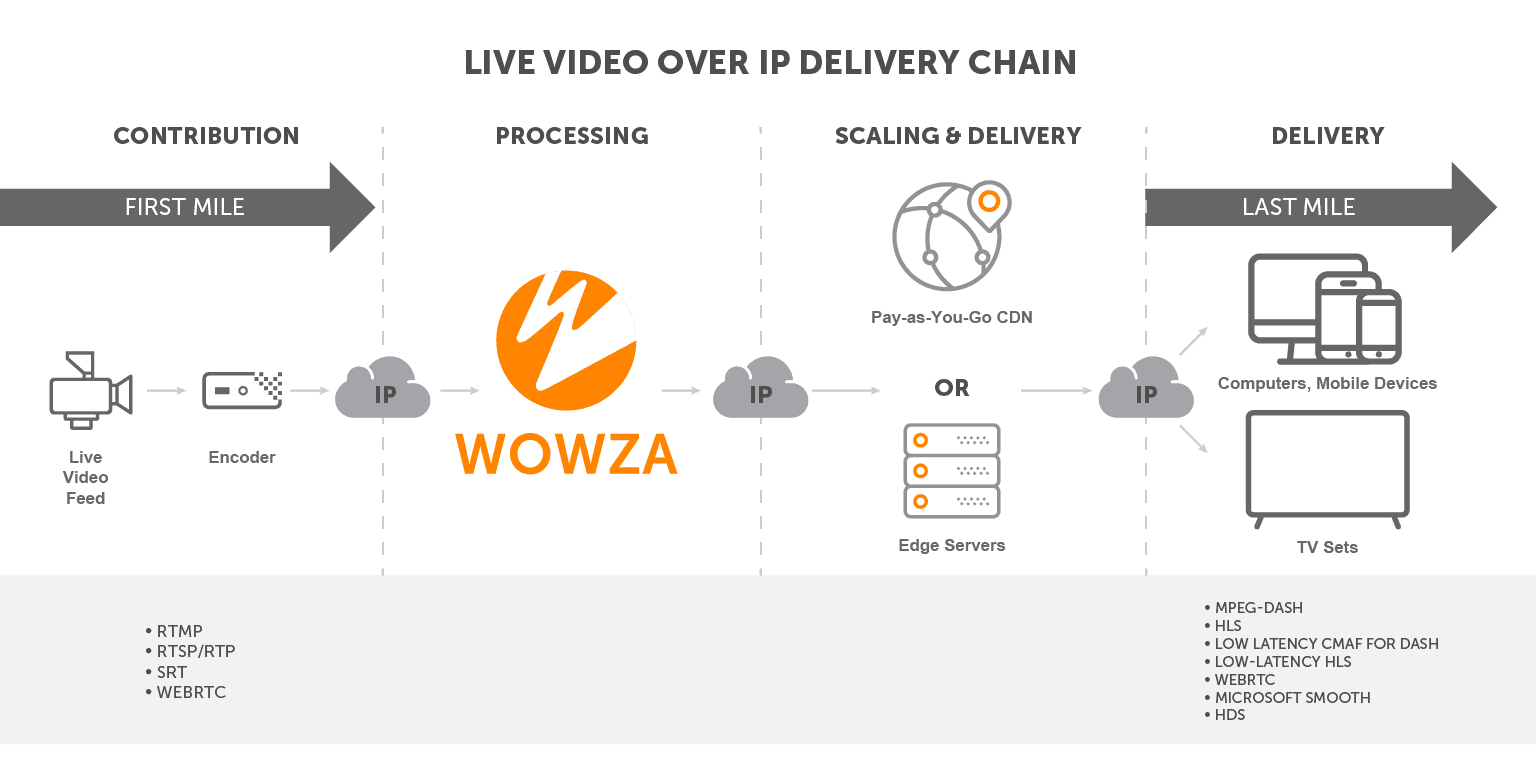
This simple workflow allows for efficient real-time delivery of live video content.
What Is RTMP Used For?
RTMP is most commonly used for:
- Live Broadcasting: Delivering real-time video feeds to audiences during sports events, concerts, and other live events.
- Ingesting Streams: Sending video data from an encoder to a streaming server.
These applications demonstrate RTMP’s enduring relevance, even as newer protocols emerge.
What are RTMP settings?
RTMP settings are the configuration parameters required to establish and maintain a Real-Time Messaging Protocol connection between an encoder and a streaming server. Core settings include the RTMP server URL (formatted as rtmp://server-address:1935/application-name), stream key, video codec (typically H.264), audio codec (typically AAC), bitrate, resolution, frame rate, and keyframe interval. For security, RTMPS encrypts the connection over SSL. Password authentication can be a requirement at the server level. A 2-second keyframe interval paired with CBR (Constant Bitrate) encoding produces the most predictable results for downstream HLS or DASH delivery through Wowza Streaming Engine.
How to configure RTMP?
To configure RTMP, point an encoder to the streaming server’s RTMP ingest endpoint and supply a valid stream key. In Wowza Streaming Engine, the RTMP URL is structured as domain or IP, port, application name, and stream name. In the encoder, select RTMP as the output protocol, paste the URL and stream key, then set the video codec to H.264, audio to AAC, keyframe interval to 2 seconds, and rate control to CBR. Start the stream and confirm ingest through the server’s incoming streams monitor.
How to stream to RTMP server?
Streaming to an RTMP server takes five steps:
- Set up the server-side application. In Wowza Streaming Engine, open the Manager interface and reference or create a live application that listens on TCP port 1935 (or port 443 for RTMPS).
- Construct the ingest URL and stream key. Format the URL as rtmp://[server-address]:1935/[application-name]/stream-key. The stream name functions as the stream key and can be any text/number combination (defined at the encoder). Note that Wowza live applications support stream publishing authentication, which is configured in both the live application dialog and the server configuration page in Wowza Streaming Engine Manager.
- Configure the encoder. In any RTMP encoder, complete the workflow for publishing RTMP. For example, using OBS Studio, navigate to Settings, then Stream, then choose Custom as the service. Paste the RTMP URL into the Server field and the stream name into the Stream Key field. Hardware encoders follow the same pattern under their RTMP output settings.
- Match codec and rate parameters. Set the video codec to H.264, audio codec to AAC, keyframe interval to 2 seconds, and rate control to CBR. These settings produce the most predictable behavior for downstream HLS or DASH packaging.
- Set the bitrate. Send 2,500 Kbps for 720p or 6,000 Kbps for 1080p.
- Start the stream and verify the connection. Begin streaming from the encoder, then open the Incoming Streams monitor in Wowza Streaming Engine Manager to confirm an active connection and incoming frames.
For encrypted streams, use the rtmps:// prefix and confirm the encoder supports SSL/TLS over TCP port 443.
Is RTMP Outdated?
RTMP is valuable for ingest in modern streaming workflows, even though it’s closely associated with the now-deprecated Adobe Flash Player as a playback protocol. Platforms like OBS Studio continue to rely on it for ingesting streams before converting them into more scalable playback formats like HLS or DASH. Its simplicity, compatibility, and low latency ensure that RTMP still plays a role in contemporary streaming workflows.
What’s better than RTMP?
Different protocols may be better than RTMP based on the workflow stage. The right protocol depends on whether the workflow prioritizes latency, network resilience, encryption, scale, or compatibility with existing camera infrastructure. RTMP still excels at simple, low-latency contribution from an encoder to a streaming server. For most other parts of the modern video pipeline, other protocols offer measurable improvements:
- WebRTC delivers sub-second interactive playback in browsers and peer-to-peer applications.
- SRT handles first-mile contribution across the public internet, where its UDP transport, ARQ retransmission, and built-in AES encryption outperform RTMP’s TCP-bound architecture. SRT is also particularly superior when streaming over great distances (e.g. from Europe to Australia)
- RTSP/RTP powers IP camera transport and ONVIF-compliant surveillance workflows, where UDP transport supports the ultra-low latency that real-time monitoring demands.
- Apple HLS and MPEG-DASH scale playback and last-mile delivery to viewers through adaptive bitrate over HTTP and ubiquitous CDN compatibility.
- Media over QUIC (MoQ) represents an emerging single-protocol approach designed to unify contribution and delivery in one stack.
Is RTMP 1935 TCP or UDP?
Port 1935 is TCP. RTMP runs exclusively over TCP to guarantee in-order, lossless delivery of audio, video, and metadata packets between the encoder and the streaming server. RTMPS, the secure variant, uses TCP port 443. While 1935 is the default, media servers like Wowza Streaming Engine can be configured to accept RTMP on any port. Modern transport protocols such as SRT use UDP with built-in retransmission as an alternative to RTMP.
Is RTMP Better Than RTSP?
When comparing RTMP vs RTSP, each protocol has its intended use.
- RTMP Pros:
- Lower latency for interactive streams.
- Broader compatibility with streaming platforms and encoders.
- More user-friendly setup for many broadcasters.
- Widely supported in chipsets and hardware
- RTSP Pros:
- Widely used in IP cameras and surveillance systems.
- Raw streaming capabilities that simplify certain internal network applications.

RTMP tends to be more effective for live content delivery to global audiences, while RTSP often works better in closed, surveillance-related environments.
Advantages of RTMP
It offers several benefits that contribute to its ongoing usage:
- Low Latency: Crucial for live and interactive content.
- Compatibility: Works with many existing platforms and CDNs.
- Simplicity: Easy setup and reliable performance.
- Adaptability: Can be used in various live streaming scenarios, from gaming to professional broadcasts.
These advantages make it an enduring choice for certain streaming workflows.

When considering the many contribution protocol options, what are the disadvantages of RTMP?
The main disadvantages of RTMP are:
- Lack of native browser playback after Flash’s deprecation
- TCP-only transport that introduces head-of-line blocking risk on congested networks
- Limited codec support without the ERTMP extension
- No native adaptive bitrate
RTMP Protocol Variations and Encoding
Over time, RTMP has evolved to include multiple variations:
- RTMPE: Offers basic encryption for enhanced security.
- RTMPS: Adds SSL/TLS encryption to secure streaming data.
- RTMP Encoded Streams: Commonly used by platforms like YouTube Live and Facebook Live for ingesting and distributing streams.
- ERTMP provides extended codec support and ABR options
These variations highlight its ability to adapt to different security and workflow requirements.
Related Apps/Platforms
Real-Time Messaging Protocol remains well-supported by a range of streaming software and platforms:
- OBS Studio: A popular choice for live broadcasting.
- Mobile Apps: Many iOS and Android streaming apps still offer RTMP options.
- Streaming Services: Major platforms continue to accept RTMP streams, ensuring that broadcasters can rely on familiar workflows.
FAQs
What is the primary purpose of RTMP?
RTMP facilitates lower-latency live streaming and ensures a stable, real-time connection between broadcasters and servers.
Is RTMP still a viable protocol for modern streaming?
Yes, RTMP is still a widely-used ingest protocol, particularly for workflows that rely on lower latency and compatibility with existing platforms.
Can RTMP work with popular streaming software like OBS?
Absolutely. OBS Studio, along with many other broadcasting tools, natively supports Real-Time Messaging Protocol streaming, making it a common choice for live content creators.
Is RTMP secure?
RTMP’s security depends on the transport variant and the publish authentication layer configured on the server. Out of the box, plain RTMP sends data unencrypted over TCP port 1935, which exposes streams to interception on untrusted networks. For encrypted transport, use the RTMPS variant, which wraps the RTMP connection in SSL/TLS over TCP port 443 (the same port used for HTTPS) and is the configuration recommended for any contribution path that traverses the public internet. On the publish-authentication side, Wowza Streaming Engine provides several layered options:
- Username/password authentication: Wowza Streaming Engine can require encoders to supply credentials at connect time. This is configured per live application in Wowza Streaming Engine Manager and applies to both RTMP and RTSP sources.
- Secure URL parameters (ModuleSecureURLParams): For encoders that do not support credential-based authentication, Wowza Streaming Engine’s ModuleSecureURLParams module validates a hash appended to the stream URL, preventing unauthorized sources from publishing without requiring encoder-side credential support.
- Centralized security configuration: The Security tab in Wowza Streaming Engine Manager consolidates publish protection, playback protection, SecureToken, and SSL/TLS certificate management in a single location, making it practical to enforce a consistent policy across applications.
The best practice is to combine transport encryption (RTMPS) with at least one publish-authentication method. Plain RTMP without authentication provides no protection against unauthorized publishing or stream interception, while a properly-configured RTMPS connection with username/password or SecureURL authentication addresses both threat surfaces.
Are there more secure versions of RTMP available?
Yes. Variations like RTMPS and RTMPE offer enhanced security by encrypting the streaming data.
What is enhanced RTMP?
Enhanced RTMP (ERTMP) is a set of backward-compatible extensions to the RTMP and FLV specifications. It adds support for modern video codecs, including HEVC (H.265), AV1, and VP9, along with HDR metadata, multitrack audio and video, and improved timestamp precision. Enhanced RTMP preserves the original RTMP connection model while removing the protocol’s long-standing limitation to H.264 and AAC.
Is enhanced RTMP better than RTMP?
Enhanced RTMP is not a replacement, it is a superset of RTMP. A standard RTMP stream using H.264 and AAC continues to work exactly as before. Enhanced RTMP becomes the better choice when the workflow requires a next-generation codec like HEVC or AV1 for higher quality at lower bitrates, HDR color metadata for wide-gamut content, or multitrack capabilities for sending multiple renditions over a single connection. If the encoder, server, and delivery chain all support the extended spec, enhanced RTMP delivers measurably better video quality at the same bandwidth.
Does OBS support enhanced RTMP?
Yes. OBS Studio added enhanced RTMP support in version 29.1, enabling HEVC and AV1 streaming over RTMP connections. To use it, open Settings > Output, switch to Advanced mode, and select an HEVC or AV1 encoder (hardware-accelerated NVENC options are available on supported NVIDIA GPUs). Note that the receiving server or platform must also support enhanced RTMP. YouTube enabled it as a beta feature, and compatible media servers like Wowza Streaming Engine can ingest HEVC streams for transmuxing to HLS or DASH.
How to stream with enhanced RTMP?
Streaming with enhanced RTMP requires three things:
- An encoder that supports the extended spec
- A server or platform that can ingest it
- A compatible codec selected in your encoder settings.
In OBS Studio, go to Settings > Output > Advanced > Streaming and choose an HEVC or AV1 encoder. Set your RTMP server URL and stream key as usual. The enhanced RTMP handshake is negotiated automatically when both sides support it. On the server side, confirm the ingest application accepts the target codec. Wowza Streaming Engine supports HEVC ingest and can transcode or transmux the stream into HLS, CMAF, or DASH for delivery to viewers.
How to test your RTMP Workflow
To try out your workflow, we offer a free Test Player with support for MPEG-DASH and HLS on Safari.†
The Role of RTMP in Modern Streaming Workflows
Its legacy as a low-latency, reliable streaming protocol ensures its continued relevance. While newer technologies have emerged, RTMP remains a staple for live broadcasting, interactive events, and efficient stream ingesting. Understanding its capabilities and applications helps broadcasters and content creators deliver seamless, high-quality video experiences to their audiences.
Ready to learn more about how Real-Time Messaging Protocol fits into your streaming strategy? Contact a Wowza Streaming Expert today for personalized guidance and support. Whether you’re new to live streaming or looking to optimize your existing workflow, we’re here to help. Click here to connect with a Wowza expert and unlock the full potential.