RTSP: The Real-Time Streaming Protocol Explained (Update)
The Real-Time Streaming Protocol (RTSP) is a time-tested video technology. It’s used to control audio/video transmission between two endpoints and facilitate the transportation of low-latency streaming content across the internet.
The Real-Time Messaging Protocol (RTMP), along with RTSP, once dominated the streaming landscape. That’s no longer the case today. Nevertheless, RTSP remains a cornerstone in many security and surveillance architectures, particularly in closed-circuit television (CCTV) systems. The reason is simple: it’s still the preferred protocol for IP cameras.
In this article, we’ll delve into the RTSP specification, explore its history, and outline common workflows utilizing this protocol for real-time video streaming applications.
Table of Contents
What Is a Protocol?
Protocols establish rules for data transmission between systems. For example, the Hypertext Transfer Protocol (HTTP) defines how to transmit webpage data and hyperlinks across the Internet. This enables seamless browsing.
Similarly, streaming protocols govern the delivery of live and on-demand content. These protocols function for both ingest (first-mile) and egress (last-mile) transmission. RTSP plays a key role in real-time video streaming architecture, orchestrating sessions between a source and a streaming server.
What Is RTSP?
RTSP is an application-layer protocol that commands streaming media servers via pause and play capabilities. It thereby facilitates real-time control of the streaming media by communicating with the server, without actually transmitting the data itself. Rather, servers often leverage the Real-Time Transport Protocol (RTP) in conjunction with the Real-Time Control Protocol (RTCP) to move the actual streaming data.
The official 1998 RTSP standard states:
“The Real-Time Streaming Protocol (RTSP) establishes and controls either a single or several time-synchronized streams of continuous media such as audio and video. It does not typically deliver the continuous streams itself, although interleaving of the continuous media stream with the control stream is possible. In other words, RTSP acts as a ‘network remote control’ for multimedia servers.”
When a user initiates a video stream from an IP camera using RTSP, the device sends an RTSP request to the streaming server, initiating the setup process. Subsequently, RTP transmits the audio and video data. Think of it as a remote control for media streaming, while RTP handles the actual broadcast.
RTSP: A Snapshot
- Audio Codecs: AAC, AAC-LC, HE-AAC+ v1 & v2, MP3, Speex, Opus, Vorbis
- Video Codecs: H.265 (preview), H.264, VP9, VP8
- Playback Compatibility: Not widely supported and rarely used for playback (Quicktime Player and other RTSP/RTP-compliant players, VideoLAN VLC media player, 3Gpp-compatible mobile devices)
- Benefits: Low-latency and ubiquitous in IP cameras
- Drawbacks: Not optimized for quality of experience and scalability
- Latency: 2 seconds
- Variant Formats: RTSP as an umbrella term describes the entire stack of RTP, RTCP (Real-Time Control Protocol), RTSPS (RTSP over SSL / Secure RTSP), and good-old RTSP
What are RTSP commands?
RTSP employs various commands to control media streams. These include:
- Options: This request determines what other types of requests the media server will accept.
- Describe: A describe request identifies the URL and type of data.
- Announce: The announce method describes the presentation when sent from the client to the server and updates the description when sent from the server to the client.
- Setup: Setup requests specify how a media stream must be transported before a play request is sent.
- Play: A play request starts the media transmission by telling the server to start sending the data.
- Pause: Pause requests temporarily halt the stream delivery.
- Record: A record request initiates a media recording.
- Teardown: This request terminates the session entirely and stops all media streams.
- Redirect: Redirect requests inform the client that it must connect to another server by providing a new URL for the client to issue requests to.
Other types of RTSP requests are detailed here, including ‘get parameter,’ ‘set parameter,’ and ’embedded (interleaved) binary data.’
Typical RTSP Workflow
RTSP is a stateful protocol used more often for video contribution (ingest) than for last-mile delivery and playback (egress). Android and iOS devices don’t have RTSP-compatible players out of the box. So, people rarely use RTSP for end-to-end streaming. Instead, most broadcasters leverage a streaming server like Wowza to repackage the RTSP stream into a more user-friendly format like HLS.


History of RTSP Streaming
RTSP emerged in the late 1990s from Netscape Communications, Progressive Networks (RealNetworks), and Columbia University. The Internet Engineering Task Force (IETF) officially published it in 1998, with Version 2.0 introduced in 2016 to optimize session communication.
Before adaptive bitrate streaming (ABR) via HLS (HTTP live streaming)and MPEG-DASH (dynamic adaptive streaming over HTTP), RTSP and RTMP dominated the live streaming space. However, they were not suited for large-scale streaming due to their reliance on dedicated servers.
Primarily, organizations use RTSP for ingest. In other words, it is used in the first part of the streaming workflow, before the streams are transmuxed for delivery. Most workflows leverage a media server to ingest streams transmitted via RTSP/RTP and then repackage the file for delivery to viewing devices — ranging from iPhones to smart TVs.
Next-generation alternatives like Secure Reliable Transport (SRT) are competing directly with RTSP for video contribution today. Even so, RTSP remains popular in surveillance workflows as the de facto standard for IP cameras.
What is an RTSP stream?
An RTSP stream is a live audio and video session controlled by the Real-Time Streaming Protocol (RTSP), an application-layer protocol that handles session commands like setup, play, pause, and teardown. RTSP itself does not transport the media. It works alongside the Real-Time Transport Protocol (RTP), which carries the audio and video packets between endpoints. RTSP streams remain the dominant ingest format in IP camera and surveillance workflows.
How do I view an RTSP stream?
Web browsers and most consumer devices do not natively support RTSP playback, so viewing an RTSP stream usually requires a compatible player like VLC, QuickTime, or a 3GPP-compliant mobile player. For browser-based or large-scale playback, the standard approach routes the feed through a media server such as Wowza Streaming Engine, which transmuxes the stream into HLS, MPEG-DASH, or WebRTC for delivery to viewing devices.
How do I set up an RTSP stream?
Setting up an RTSP stream requires three components: a source that publishes RTSP/RTP (typically an IP camera, encoder, or software like FFmpeg), a media server to ingest and manage the session, and the network configuration to connect them. The general workflow is:
- Configure the source. On an IP camera, locate the RTSP settings in the device’s web interface and enable the RTSP server. Note the stream URL, which usually follows the format
rtsp://[username:password@]camera-ip:554/path. For software encoders, point the RTSP output at the destination server’s IP and port. - Provision the media server. There are two distinctly different provisioning workflows, depending on whether you’re working with a camera or an encoder. Camera streams will generally be provisioned on Wowza Streaming Engine using the
.streamfile, where the WSE server initializes the connection. Encoder streams are generally provisioned on the encoder, where the encoder initializes the connection.- For camera streams, first create a live application configured to accept RTSP/RTP ingest in Wowza Streaming Engine. Generate a
.streamfile or use the Stream Files interface to define the source URL the server should pull from, or configure the camera to push to the server’s RTSP endpoint. To make an IP camera connection persistent, add the.streamfile to the StartupStreams list so it reconnects when the server restarts. - For encoder streams, the encoder needs to be configured to connect to an RTSP endpoint on Wowza Streaming Engine.
- For camera streams, first create a live application configured to accept RTSP/RTP ingest in Wowza Streaming Engine. Generate a
- Open the required ports. RTSP uses TCP port 554 by default for session control, with RTP media flowing over dynamically negotiated UDP ports (or interleaved over the same TCP connection for firewall-restricted environments). Make sure the firewall permits traffic between the camera and the server on these ports.
- Start the stream and verify ingest. Launch the source, then confirm the media server is receiving the feed. From there, the server can transmux the RTSP/RTP stream into HLS, MPEG-DASH, or WebRTC for delivery to viewers.
How do I test an RTSP stream?
Testing an RTSP stream confirms that the source publishes successfully and that the stream remains reachable, decodable, and playable downstream. The fastest method opens the RTSP URL in VLC (Media > Open Network Stream) to verify the video renders without errors. For a more complete test, ingest the stream into Wowza Streaming Engine and validate playback through the Wowza test players.
How do I check an RTSP stream URL?
RTSP URLs follow a standard format: rtsp://[username:password@]host[:port]/path, with TCP port 554 as the default. Most IP cameras publish the exact stream URL in the device’s web interface or product documentation, with manufacturers like Axis, Hanwha, Hikvision, and Dahua listing it under streaming or network settings. To verify the URL works, paste it into VLC or send it to a media server endpoint and confirm a successful SETUP and PLAY exchange.
Is there a way to test an RTSP stream for free?
Yes. Wowza provides a free, looping RTSP test stream that validates incoming RTSP connections for any app, encoder, or service expecting an RTSP source. The test URL works immediately without an account and offers a quick way to confirm that an integration accepts RTSP input correctly.
RTSP vs. Alternative Ingest Formats
RTMP is the most popular protocol used for first-mile contribution. It is a proven alternative to RTSP. In fact, a whopping 76.6% of respondents to our 2021 Video Streaming Latency Report indicated that they use RTMP for ingest.
As shown below, Web Real-Time Communications (WebRTC) and SRT are also popular formats, with only 18.6% of content distributors today relying on RTSP.
Which streaming formats are you currently using for ingest?
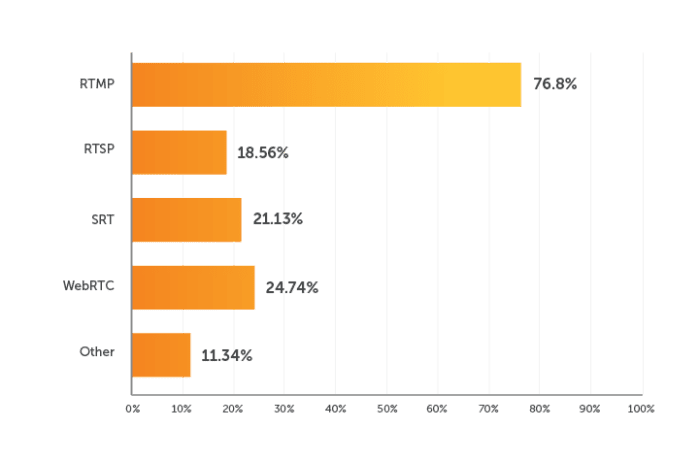
Here’s a look at how the three options compare.
RTMP
RTSP’s oldest rival is RTMP. It’s a better choice if streaming directly to a social media platform. More encoders and live streaming services accept RTMP.
Facebook, Twitch, and YouTube — for instance — only accept RTMP for low-latency live streaming. That means you’ll either want to encode your stream as RTMP from the get-go, or repackage any RTSP streams as RTMP using a video platform provider like Wowza. The latter option would also enable simulcasting to multiple destinations at once, making it a good route for those looking to live stream from an IP camera to social media.
SRT
As an open-source technology optimized for unpredictable networks, SRT promises to displace RTSP and RTMP once widely supported. Encoders and media servers are still adding support for SRT, and streaming services like Facebook could very well follow.
In a Wowza LinkedIn poll, SRT generated the most interest for first-mile contributions. Also, SRT is optimized for unpredictable public networks. It combines speed and reliability into a single solution.

WebRTC
The speediest technology available right now is WebRTC. It delivers near-instantaneous voice and video to and from any major browser. It’s also the only answer if simplicity is key. Unlike RTMP, RTSP, and SRT, WebRTC can be streamed from end to end, without additional processing.
WebRTC used to be restricted to small-scale streaming and browser-based publishing. But, that’s all changing. A technology called the WebRTC HTTP Ingest Protocol (WHIP) provides encoding software and hardware with a standard signaling protocol when talking to media servers, thus removing WebRTC connectivity barriers between encoders and media servers. And Wowza’s Real-Time Streaming at Scale feature for Wowza Video supports WHIP, as well as streaming to a million viewers.
Using Wowza as Your RTSP Server
Despite its age, RTSP has staying power as an ingest format. But — to drive it home once more — you’ll need a video repackaging solution to deliver the stream to end-user devices.
RTSP servers allow you to convert live streams into another format for playback. A media server software or service can achieve this and more. For instance, you may want to repackage your RTSP stream into HLS for large-scale delivery, or perhaps you want to use WebRTC to maintain sub-second delivery.
IP Camera Streaming: Highlight on RTSP to WebRTC
RTSP and IP cameras are closely linked. A media server typically retrieves the RTSP stream from the IP camera, transmuxes it, and delivers it in a playback-friendly format.
For real-time surveillance, RTSP-to-WebRTC workflows are popular due to sub-second latency. See our tutorial for setup guidance here.
Do all IP cameras have RTSP?
No, not all IP cameras support RTSP. While it is common in professional surveillance, many consumer-grade, battery-powered, or cloud-based cameras lack RTSP and lock users into proprietary apps with cloud subscriptions. Battery-powered cameras typically do not support RTSP because it drains batteries rapidly. Cloud-only cameras often omit this feature.
Choosing Wowza
Wowza provides a comprehensive, scalable streaming solution. Whether you need a media server for ingest, transcoding, or delivery, Wowza has you covered. Start with a free trial today.