Configure properties in Wowza Streaming Engine™ media server software to control the HLS packetizer, cupertinostreaming, splits streams into segments for playback over HLS clients.
Note: Wowza Streaming Engine 4.0.0 or later is required.
Configure HLS packetization
Configure HLS packetization for live streams
HLS packetization properties are defined for individual streaming applications.
- Open WSE Manager.
- Click the Applications tab.
- Click the name of your live application.
- Open the Properties tab.
- In the Quick Links bar, click Cupertino Streaming Packetizer.
Note: Access to the Properties tab is limited to administrators with advanced permissions. For more information, see Manage credentials.
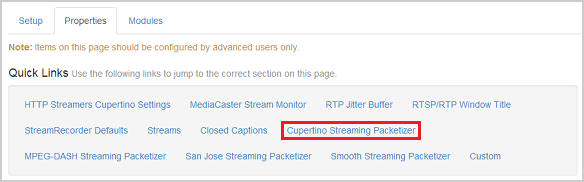
- Click Edit in the Cupertino Streaming Packetizer properties area.
- Navigate to the property you want to enable.
- Check the Enabled box to the left of the property's name.
- If needed, change the default value. (See the HLS live stream segmenter property reference for additional information.)
- Click Save.
- Restart the application.
Note: For more information about how to configure properties, see Configure properties.
HLS live stream segmenter properties
cupertinoChunkDurationTarget- Sets the duration of each chunk, in milliseconds. On an origin/edge configuration, the origin and edge servers must use the same value.
cupertinoMaxChunkCount- Sets the maximum number of chunks stored in the available chunk list.
cupertinoPlaylistChunkCount- Sets the number of items returned in the playlist.
cupertinoRepeaterChunkCount- Set the number of chunks to be sent from the origin to the edge immediately after initial connection. This property is configured on the origin and is required for live edge applications. (See theliverepeater-edgestream type in theApplication.xml.)
These four properties work together.
WSE segments audio and video from a live encoder into time-based chunks. Chunk duration (in milliseconds) is set by cupertinoChunkDurationTarget. As chunks are created, they're added to the list of available chunks. Max chunks in the list is set by cupertinoMaxChunkCount. When a player requests the HLS stream, WSE sends a playlist of the n most recently added chunks. Playlist length (n) is set by cupertinoPlaylistChunkCount.
When WSE delivers a single live stream from an origin to multiple edge servers, this is called a repeater configuration. Initial chunk count is set by cupertinoRepeaterChunkCount. The cupertinoRepeaterChunkCount setting controls the number of chunks sent immediately after initial connection. The value of tocupertinoPlaylistChunkCount must be less than or equal to cupertinoRepeaterChunkCount which must be less than cupertinoMaxChunkCount:
If cupertinoRepeaterChunkCount is less than or equal to 0, cupertinoPlaylistChunkCount will be used instead:
To ensure chunks start on a key frame, use an interval that is a factor of the cupertinoChunkDurationTarget setting.
For example, if cupertinoChunkDurationTarget = 10, use a keyframe interval of 2, 2.5, 5, or 10.
To calculate how much memory is needed to store the chunks for a single live stream, use the formula:
[total-memory-mb] = ([stream-bitrate-kbps]/([1024-kb-per-mb]*[8-bits-per-byte])) * [cupertinoChunkDurationTarget-seconds] * [cupertinoMaxChunkCount]
Enable custom HLS properties for live streams
The cupertinoCalculateChunkIDBasedOnTimecode value turns on chunk ID numbering based on incoming packet time. When enabled, the chunk ID equals the quotient of the timecode divided by the cupertinoChunkDurationTarget value.
Note: In order for the
cupertinoCalculateChunkIDBasedOnTimecodeparameter to work properly, the enocder must send WSE synchronized timecodes that advance at a constant rate. If you usecupertinoCalculateChunkIDBasedOnTimecodewithout synchronized timecodes, the chunk ID may be incorrect when the stream restarts.
- On the application page Properties tab, click Custom in the Quick Links bar.
- In the Custom section, click Edit.
- Click Add Custom Property and specify the following:
- Path - Select
/Root/Application/LiveStreamPacketizers.
- Name - Enter
cupertinoCalculateChunkIDBasedOnTimecode.
- Type - Select
Boolean.
- Value - To start Apple HLS chunk IDs at 0, enter false. To calculate Apple HLS chunk IDs based on the incoming live stream timecodes, enter true. Use this mode to synchronize chunk IDs between two servers that packetize the same live stream.
- Path - Select
- Click Add.
- Click Save.
- Restart the application.
cupertinoForceEndChunkWhenNoKeyframes – (WSE v4.7.5+) Ends chunks when keyframes aren't received.
- On the application page Properties tab, click Custom in the Quick Links bar.
- In the Custom section, click Edit.
- Click Add Custom Property and specify the following settings:
- Path - Select
/Root/LiveStreamPacketizers.
- Name - Enter
cupertinoForceEndChunkWhenNoKeyframes.
- Type - Select
Boolean.
- Value - Set to
trueto end chunks when no keyframes are received, and then use thecupertinoChunkDurationOverflowThresholdproperty to configure the threshold at which chunks are ended. The default value isfalse.
- Path - Select
- Click Add.
- Click Save.
- Restart the application.
cupertinoChunkDurationOverflowThreshold – Helps the packetizer recover if the video drops out or keyframes aren't present. If the threshold is exceeded, the live stream packetizer restarts.
Notes:
- With WSE v4.7.5+ or later, to use the
cupertinoChunkDurationOverflowThresholdproperty, you must setcupertinoForceEndChunkWhenNoKeyframestotrue.- You only need to add this property if you want to modify the default chunk duration overflow threshold, which is five times the cupertinoChunkDurationTarget value.
- On the application page Properties tab, click Custom in the Quick Links bar.
- In the Custom section, click Edit.
- Click Add Custom Property and specify the following:
- Path - Select
/Root/LiveStreamPacketizers.
- Name - Enter
cupertinoChunkDurationOverflowThreshold.
- Type - Select
Integer.
- Value - Enter a value, in milliseconds. The default value is five times the
cupertinoChunkDurationTargetvalue.
- Path - Select
- Click Add.
- Click Save.
- Restart the application.
Configure HLS properties for VOD streams
You can control the video-on-demand (VOD) chunk size by adding the cupertinoChunkDurationTarget property to your VOD application configuration.
- Open WSE Manager
- Click the Applications tab.
- Click the name of your VOD application.
- Navigate to the Properties tab
- In the Quick Links bar, click Custom.
Note: Access to the Properties tab is limited to administrators with advanced permissions. For more information, see Manage credentials.
- In the Custom area, click Edit.
- Click Add Custom Property and specify the following:
- Path - Select
/Root/Application/HTTPStreamer. - Name - Enter
cupertinoChunkDurationTarget. - Type - Select
Integer. - Value - Enter a value (in milliseconds) to specify the default VOD chunk size.
- Path - Select
- Click Add, click Save, and then restart the application.
Configure Apple HLS packetization in XML
If you configured the properties in WSE Manager, skip this section. If you make changes to Application.xml, any supported settings are displayed in WSE Manager the next time it's started.
Configure HLS packetization for live streams
- Open the
Application.xmlfile for your live application in a text editor. - Add any of the supported properties for HLS (Cupertino) live streams to the <LiveStreamPacketizer> properties container element. For details on them, see HLS (Cupertino) live stream segmenter property reference and Enable custom HLS (Cupertino) properties for live streams, above. The XML looks like this:
<LiveStreamPacketizer> <Properties> <Property> <Name>cupertinoChunkDurationTarget</Name> <Value>10000</Value> <Type>Integer</Type> </Property> <Property> <Name>cupertinoMaxChunkCount</Name> <Value>10</Value> <Type>Integer</Type> </Property> <Property> <Name>cupertinoPlaylistChunkCount</Name> <Value>3</Value> <Type>Integer</Type> </Property> <Property> <Name>cupertinoRepeaterChunkCount</Name> <Type>Integer</Type> <Value>-1</Value> </Property> <Property> <Name>cupertinoCalculateChunkIDBasedOnTimecode</Name> <Value>false</Value> <Type>Boolean</Type> </Property> </Properties> </LiveStreamPacketizer> - Save.
- Restart Wowza Streaming Engine.
Configure HLS packetization for VOD streams
- Open the
Application.xmlfile for your VOD application in a text editor. - Add the
cupertinoChunkDurationTargetproperty to the<HTTPStreamer>properties element. The XML looks like this:<HTTPStreamer> <Properties> <Property> <Name>cupertinoChunkDurationTarget</Name> <Value>10000</Value> <Type>Integer</Type> </Property> </Properties> </HTTPStreamer> - Save.
- Restart Wowza Streaming Engine.
More resources
- Debug AAC or MP3 timecode issues with Apple HLS packetization in Wowza Streaming Engine
- Turn off data event processing for HLS streams in Wowza Streaming Engine
- Configure Wowza Streaming Engine to packetize HLS audio using TS chunks
- Improve playback of lower-latency Apple HLS streams from Wowza Streaming Engine





